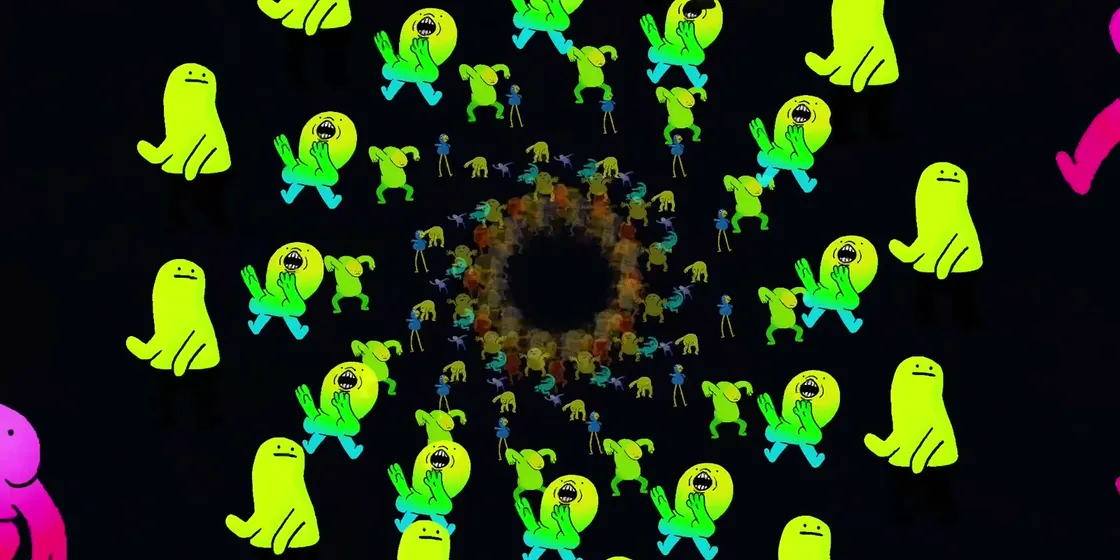
SlapChop: Mixing Media in Fun and Stupid Ways
I make a lot of short, weird videos for my Instagram. Most of them start the same way: a folder full of animated GIFs and a crazy idea about what to do with them. Wallpaper a tunnel with them. Fly through a cloud of them. Paint with them like they’re a brush.
For a long time I built those ideas one at a time in TouchDesigner. This year I built a tool for it instead. It’s called SlapChop, and its GitHub description says it all: mixing media in fun and stupid ways. The name comes from the infomercial kitchen gadget: you slap it, it chops things up. That’s more or less what this does to GIFs.
It’s a local-first generative motion studio that runs in your browser or as a native Mac app. You point it at a folder of GIFs, pick a mode, push some sliders around, and export a frame-exact video at 9:16, 16:9 or 1:1. You can open it right now. There’s nothing to install, no account and no upload; everything happens in your browser tab. The code is on GitHub under the MIT license.
Instruments, not outputs
If you came up through Processing, you know the feeling Processing was built around: code as an artistic medium, not just a way to ship software. You write a sketch, you hit play, you tweak a number, you hit play again.
SlapChop is that same idea, grown up. Instead of writing a new sketch for every idea, I build an instrument with knobs on it, and then I play the instrument. That distinction matters more to me now than it ever has. There are plenty of ways to type a sentence and get art back. I’d rather make my own tools and make the art with them.
Why GIFs?
Because there are so many of them, and they’re all moving at once. A single composition might have sixty different animations running simultaneously, each on its own loop, and that density is what makes these pieces feel alive. Transparent GIF stickers are especially good. With no background box around them, they work beautifully in the modes where things float around in 3D space.
From TouchDesigner to the web stack
I’d been building these GIF experiments in TouchDesigner, and TD is still where a lot of my finished pieces end up. But I wanted to work more agentically, and coding agents are a lot more fluent in TypeScript and React than in TouchDesigner networks. So I moved the prototyping into the web stack.
It started in Google AI Studio, which is a great place to prove out an app idea fast. The prototype was called Prism, and all it did was make kaleidoscopic collages out of GIFs. I made a bunch of ridiculous compositions with it, had way too much fun, and knew the idea had legs. So I exported the code to a GitHub repo and kept building with Codex and Claude.
That was August 16. The very first commits after the import were the boring, load-bearing ones: rename the thing, prune the scaffolding, add a real state store, an imperative render loop, undo/redo and project files. Three months later it’s a Tauri desktop app and a hosted web app built from the same codebase, with ten modes.
The modes
Here’s the tour. Every clip below was exported straight out of SlapChop, and every one is a seamless loop.
GIF Rings
My favorite. You fly through an endless corridor of rings, and each ring is made of GIFs. It’s simple, hypnotic, and it never stops giving. This post is a good example: an infinite radial zoom through looping illustrations by mastertingus.
GIF Tunnel
A procedurally bent, endlessly advancing low-poly tunnel, wallpapered with GIFs. Here it’s TV static and iridescent chrome, with the panes pulsing in scale.
GIF Flythrough
Point it at a folder and it builds a seeded particle field of GIFs for the camera to rush through. Eyeballs, fish, skulls, horses. Normal stuff.
GIF Landscape
A continuous flight over noise-displaced, low-poly terrain tiled with GIFs, under a sky made from another folder of them.
GIF Grid
A folder of GIFs stretched across an elastic grid whose rows and columns ripple, wave and drift.
Symmetry
The direct descendant of Prism. Drop in GIFs as layers, then mirror, quad, radially repeat or Droste-spiral each one, with blend modes and sine and noise motion on top.
Polygon Tiler
Preset or hand-drawn polygons filled with a repeating GIF texture, which can be shattered into animated Voronoi shards. It also has a pressure-sensitive brush tool with draw-on animation.
3D Space
Textured meshes, camera depth and 3D deformation. Here, a carousel of wobbling striped donuts.
There’s also GIF Voronoi, which divides the whole frame into an organic mosaic of drifting cells, and GIF Paint, which gets its own section below.
Every mode is its own app
Early on, the agent I was working with kept doing what a well-behaved engineer should do: it looked for reusable pieces. If two modes both had something called “symmetry,” it wanted one shared symmetry type. If two modes had inspectors, it wanted them to line up.
That’s normally good engineering. Here it was exactly wrong. I wanted every mode to be radically different from the others. If I have a weird idea for a mode, I don’t want to squeeze it into an app-wide pattern. I want to build it more or less from the ground up.
So I wrote it down as an architecture decision. SlapChop is a collection of independent creative modes inside one studio. Modes share a platform: the output canvas, deterministic frame time, asset loading, exports and the app shell. They don’t share a feature set or a document model. From the decision doc:
Sharing an implementation is an optimization, not a product requirement. We should extract shared code after the semantics prove identical; we should not change a mode’s concepts to make extraction possible.
Once that was written down, the agents stopped trying to unify everything, and the modes got a lot weirder. Which was the point.
Playing it
The part that makes it feel like an instrument is that everything is live. Drag a slider and the scene responds immediately, at whatever frame rate your GPU can manage. That’s 119 fps with WebGPU in this recording:
Switching between motion patterns in GIF Grid:
And building up a single banana GIF in Symmetry, from a vertical mirror to a Droste spiral to a radial repeat:
Deep dive: making GIF Paint fast
GIF Paint is the newest mode and the one that fought back hardest. Every brush stamp is a frame of a GIF, frozen at the moment the brush passed over that spot, masked to a round, flat, bristle, stipple or striped brush shape. Drag across the canvas and you leave a trail of hundreds of tiny frozen animation frames. Turn on Autopaint and SlapChop paints by itself with human-like meandering arcs, flicks and angular turns. Then you can make a saved stroke repaint itself over and over with fresh GIF frames, so the painting keeps moving.
The first version looked great and got slower the longer you used it. Rather than just asking an agent to “make it faster,” I had it write an audit first: measure it, explain why the costs grow, and propose a sequence of fixes. Its explanation of why is the most useful part. Here are the main culprits:
- The in-progress stroke wasn’t incremental. Every display frame rebuilt the brush mask, resampled the whole recorded path and redrew the entire gesture, even when the mouse wasn’t moving. Per-frame work grew with the length of the stroke, so total work over a long gesture grew roughly quadratically.
- Adding a stroke invalidated everything below it. Finished strokes were flattened into a cached background, but the cache was keyed on the exact set of strokes. Commit one new stroke and every old one got resampled and restamped. Appending after 32, 128 and 255 strokes redrew 363, 1,419 and 2,816 stamps.
- Repainting strokes redrew every stamp, every frame. With all strokes replaying, the reference test drew more than 68,000 stamps per frame at 32 paths.
The fixes, roughly in order:
- A persistent draft surface. An append-only cursor remembers how many input samples it has processed, how much leftover distance carries into the next stamp, and where a stationary hold left off. Each frame deposits only the new stamps. If nothing changed, it does no raster work at all.
- Append without invalidating. Adding a stroke on top of an unchanged stack now stamps only the new stroke into the cached background, growing the cache’s bounds if it has to. After the fix, appending a stroke drew the same number of stamps whether there were 32, 128 or 255 strokes below it, with zero history rebuilds.
- Each repainting stroke keeps its own retained surface. It deposits only new stamps as time moves forward, and identical pre-masked GIF frames share a 4-megapixel LRU cache. At 32 repainting paths, that took the reference test from 68,475 stamp draws and 450 ms per frame to 21 draws and about 10 ms.
- An opt-in GPU path for dense autopaint. The heaviest case, fast and dense autopaint with long trails, was stuck at about 68 ms per frame on the Canvas compositor. A prototype that batches stamps into persistent GPU textures through a pool of 2,048 Pixi particles runs the same scene at 6.8 ms on WebGL and 8.1 ms on WebGPU. It’s behind a URL flag (
?paint=gpu) while I live with it.
The detail I’d steal for your own projects: the tests count operations, not milliseconds. Timing assertions are flaky on a laptop; “appending one stroke draws exactly this many stamps and causes zero rebuilds” is not. A separate in-app benchmark does pixel comparisons, checking that incremental drawing matches a fresh reconstruction of the same painting, so the speedups can’t quietly change how a painting looks.
How I stayed in control
SlapChop is entirely agentically built. I’m fine saying that, because it’s the first project where agentic coding started to feel as good as the old days of writing everything by hand. I understand the architecture, I can steer it, and I can maintain it.
The thing that made the difference: reviewable planning documents before any code. For anything non-trivial, the agent first writes a plan or an audit into docs/. Then I read it, pick it apart, and correct the parts I disagree with before anything gets built. The mode-independence decision, the GIF Paint audit, the video export benchmarks and a plan for GIPHY search all live in the repo as markdown. Reading them is how I learn my own codebase, and arguing with them is how I steer it.
Under the hood
For the stack nerds:
- React 19 + Zustand for the app, with zundo for undo/redo. The render loop is imperative and lives outside React.
- PixiJS v8 for rendering. The browser prefers WebGPU, falls back to WebGL, and keeps a Canvas 2D renderer as a fallback and a reference implementation.
?renderer=2dand?renderer=webglforce a backend for comparison. three.js handles the 3D modes and d3-delaunay the Voronoi. - Deterministic, frame-exact exports. Every frame is rendered at its exact timestamp, so offline exports never drop frames and loops close perfectly. The browser encodes with WebCodecs and checks that your browser can actually encode the requested codec, resolution and frame rate before you start. If it can’t, it says so and records WebM instead of pretending it’s MP4.
- Tauri desktop app. It streams raw RGBA frames to a bundled ffmpeg sidecar, so you get MP4, WebM and ProRes 4444 with alpha, frame sequences written straight to disk with resume, and exports up to six hours long. Memory doesn’t grow with duration. GIFs export through gifenc off the main thread.
.slapchopproject files embed their GIFs, so a project opens anywhere without the original folder.- TouchDesigner live output over WebRTC. The desktop app can stream its canvas straight into TouchDesigner using TD’s built-in signaling components, with no cloud in between. To be honest, it’s the feature I use least. In practice I export a video and bring that into TD. But it was a fun thing to build, and I’m sure it’ll come in handy at some point. There are also standalone TD builders for the Rings and Tunnel modes in
tools/touchdesigner.
What’s next: nothing, on purpose
With coding agents, it’s really easy to keep adding features. Every idea is an afternoon away. So the plan for now is to not add features. I want to spend a lot more time making things with what’s already there, dogfooding the tool before I build the next mode. I’ve built the instrument; now I need to practice.
Make it yours
Open SlapChop, drag in a folder of GIFs and see what happens. It works best in current Chrome or Edge. Safari and Firefox are best-effort. One warning: the browser edition doesn’t autosave, so save a .slapchop file before you refresh.
The code is on GitHub, MIT-licensed and free to use. It’s more “here’s mine, make it yours” than a big community project. Fork it, rip a mode out, build the weird mode I’d never think of. That said, I’m always open to a great idea, so feel free to file an issue or open a PR. And if you make something with it, tag me on Instagram. I’d love to see it.
Credits
The GIFs in these clips are GIPHY stickers by some wonderful artists, including Neil Sanders (the dancing animals in GIF Rings), Keyframe Kit, Pleins Écrans, Tarver, Michel Poisson, Pi-Slices and Jen Stark. Go follow them. The Instagram piece above uses animation by mastertingus.